How to improve email deliverability and avoid SPAM filters: 15 best practices for 2026

Anna Kvasnevska
Remember the time when you finally got your hands on a shiny new email platform, spent a week planning a perfect email marketing campaign, and set up the marketing contacts list, just for it to reach less than 60% of your intended audience? The culprit? Email deliverability.
Well, it’s about time we fixed it once and for all! Keep reading to find out what email deliverability is, what it has to do with spam filters, and, more importantly, you’ll find best practices to improve email deliverability and maintain a 97%+ successful rate!
What is email deliverability, and why is it important?
Email deliverability shows how likely your emails are to successfully reach your recipients’ inboxes without being blocked, bounced, or filtered into the spam folder. It measures how well people see and engage with your messages, increasing the likelihood of future campaigns getting delivered successfully.
But how does it work exactly?
Understanding email infrastructure
When you send an email, it travels through your Internet Service Provider (ISP) and is picked up by the Simple Mail Transfer Protocol (SMTP), which is responsible for delivering the email to the recipient’s mail server (IMAP) or downloading it to a device (POP3). This system ensures your email reaches its destination securely and filters out unwanted or low-quality emails for the recipients.
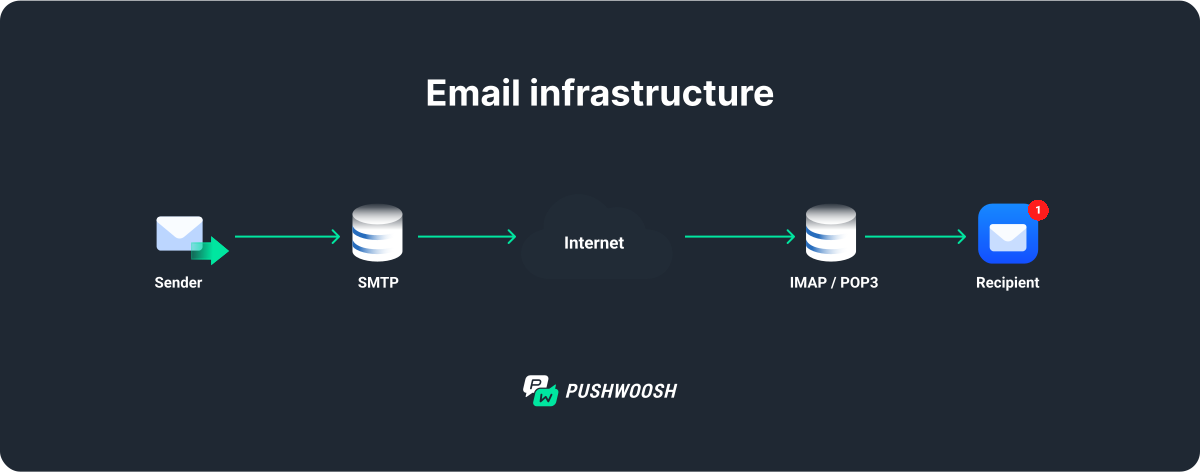
While the email infrastructure ensures your email is sent and received, deliverability focuses on its successful arrival in the inbox. Even if your entire infrastructure is properly set up and functioning, your audience may simply never see your email if the deliverability rate is low.
As such, by optimizing your email campaigns for deliverability, you ensure higher effectiveness of your marketing efforts.
Email deliverability vs email delivery
The two terms are commonly used interchangeably, but there is a slight difference from an infrastructure perspective.
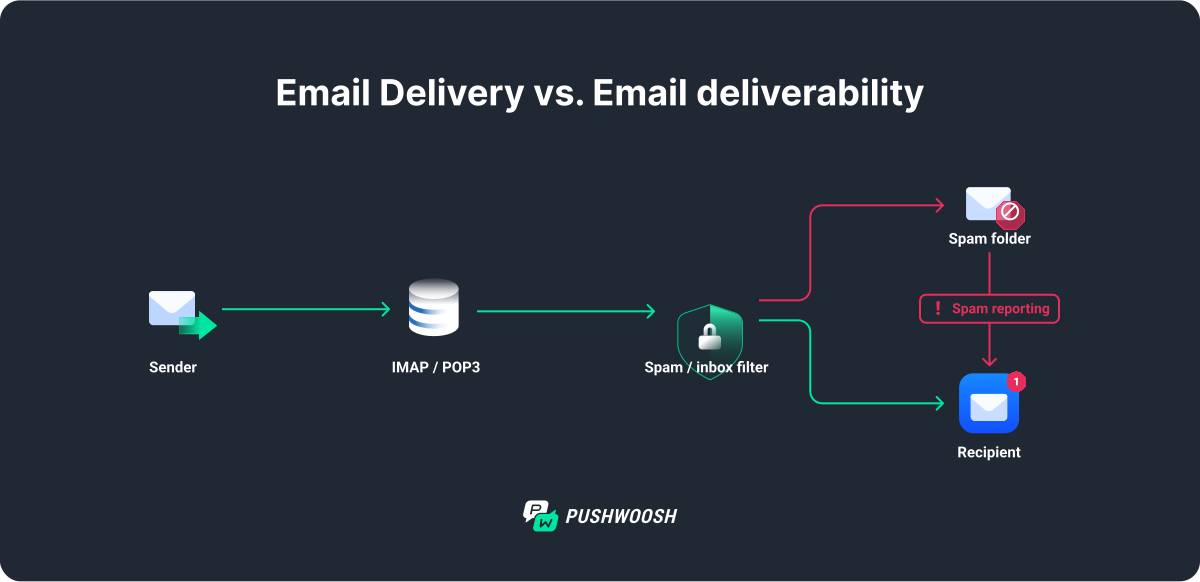
Email deliverability is about ensuring your email not only reaches the recipient’s mail server but also successfully lands in their inbox, avoiding the spam folder. Successful inbox placement is crucial because even if an email is technically delivered, it won’t be effective if it doesn’t reach the inbox. Just think about the last time you checked Gmail’s spam folder.
Email delivery, on the other hand, is the process that ensures your email successfully reaches the recipient’s mail server. This is more of a technical function, focusing on the email’s journey through the internet, navigating servers, and overcoming potential barriers like bounces or rejections.
What is a good email deliverability rate?
Email deliverability rates measure the percentage of emails that successfully reach recipients’ inboxes rather than landing in spam folders or going missing entirely. Understanding industry benchmarks helps you assess your campaign performance and identify areas for improvement.
According to recent data from Validity’s 2025 email deliverability benchmark report, the global average inbox placement rate is approximately 84%, meaning roughly one in six emails never reaches the inbox. EmailToolTester’s analysis of 15 major email service providers found an average deliverability rate of 83.1%.
Here’s how to interpret your deliverability rate:
- 95% or higher: Excellent deliverability — your sender reputation is strong.
- 89-94%: Good deliverability — room for minor optimizations.
- 80-88%: Average deliverability — requires attention to improve.
- Below 80%: Poor deliverability — immediate action needed.
Marketing emails usually perform well at 95–97%, while transactional emails often achieve 98–99% because of their high engagement and relevance.
What factors affect email deliverability (and inbox placement)
There are multiple factors that influence email deliverability when it comes to successfully getting your emails to the desired inboxes. The most crucial email deliverability factors are:
- Sender reputation
- The ability of your emails to avoid spam filters
The first one defines how reliable your communications are and how useful they may be to potential recipients. It is built through careful nurturing of your contacts and by sending only relevant messages.
Spam filters are the hoops your email has to jump through to reach the inbox.
How do email SPAM filters work?
Spam filters are like security guards for your inbox. They automatically scan incoming emails to decide whether they are safe and relevant, or should be sent to the spam folder.
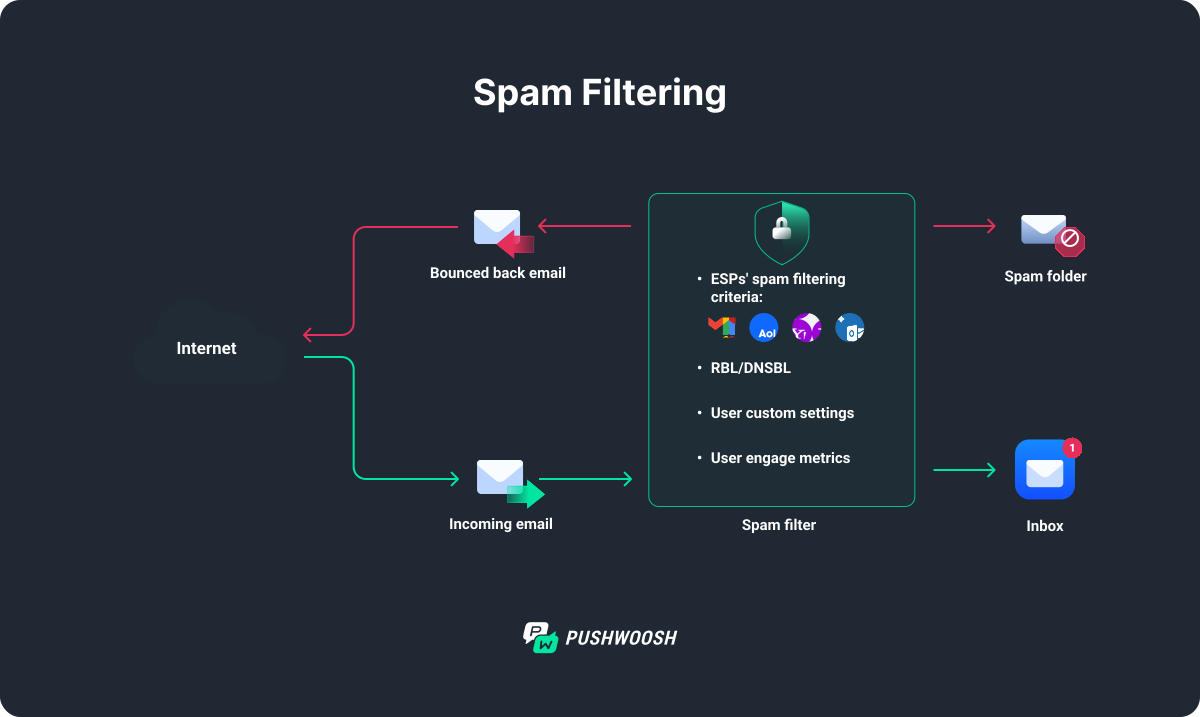
These filters rely on a set of rules and algorithms to examine different aspects of each email, such as the sender’s reputation and the email’s content, and to check it for any suspicious links or attachments.
Imagine you’re running a promo email campaign for a big sale. You craft a catchy subject line: “WIN BIG with our EXCLUSIVE DEALS!!!” and fill the email with lots of images and bold offers like “Get 70% OFF NOW!!!”. You send the email to your entire mailing list.
Alas! When the email reaches your recipients’ inboxes, spam filters kick in. They see the subject line packed with capital letters and exclamation points, an unbalanced image-to-text ratio in the body of your email, plus, some recipients have marked your previous emails as spam already—your campaign is toast.
Types of spam filters
All spam filters aim to protect recipients from unwanted emails, but they do it in different ways. Here are the most common types of email spam filters (and factors that influence email deliverability) you need to be on the lookout for when working on your next email campaign:
- Content-based filters scan the email’s content for spam trigger words, poor formatting, or suspicious patterns. For example, an email filled with all caps, multiple exclamation points, and certain trigger words might be flagged as spam.
- Blacklist filters block emails from IP addresses or domains known for sending spam. If your email server’s IP is blocklisted, your emails may be automatically marked as spam and never reach the inbox.
- Header filters analyze the technical details in the email header, such as sender information and routing paths. If these details are inconsistent or look suspicious, the email may be filtered out.
- Engagement-based filters monitor how recipients interact with your emails. If many users delete your emails without opening them or mark them as spam, future emails are more likely to end up in the spam folder.
- Language and tone filters look for unusual language patterns, excessive capitalization, or too many exclamation points. For example, if your email is too aggressive or eagerly excited, it might be flagged as spam.
- Multimedia filters evaluate the balance between text and images, and check for embedded media like videos or Flash content. Emails with too many images and little text are often considered spammy.
- Behavioral filters examine sending patterns like the frequency and volume of emails sent. If you suddenly send a large batch of emails from a new IP, they might be flagged as suspicious.
- Reputation-based filters assess the sender’s or domain’s overall reputation based on past email campaigns. If your domain has been associated with spam in the past, your emails are more likely to be blocked or filtered.
How to improve email deliverability: 15 best practices to avoid spam filters
The following email deliverability best practices will help you increase inbox placement, protect your sender reputation, and avoid spam filters in 2026. Apply these strategies consistently to ensure your emails reach real users, drive engagement, and stay compliant with Gmail, Yahoo, and industry-wide deliverability standards.
1. Keep up with the latest anti-spam laws and regulations
The king of all anti-spam regulations in email marketing is, undeniably, the American CAN-SPAM Act of 2003 (it’s regularly amended, though, don’t worry). The goal of the CAN-SPAM Act is to protect consumers from being bombarded with unwanted and misleading emails. At the same time, ensuring businesses can still use email as a marketing tool, but in a respectful and transparent way.
For businesses, it comes down to a few simple rules:
- Don’t be deceptive: You mustn’t use misleading information in your emails. Your “From,” “To,” and “Reply-To” fields must accurately represent who is sending the email, and your subject lines must reflect the content of the email.
- Include your physical or legal address: Every email must include your business’s address (usually placed in an email footer), so recipients know where to find you.
- Offer an easy way to unsubscribe: You must give recipients a clear and simple way to opt out of receiving future emails from you (usually also placed in the footer), and you must honor unsubscribe requests promptly — within 10 business days.
- Identify an email as an ad: If your email is an advertisement, you need to clearly communicate it to the recipient. This is mainly achieved by using clear and transparent language. Simply put, don’t try to mask your latest paid add-on as educational material; make sure your subject line isn’t misleading.
2. Adhere to regulatory compliance for data privacy
On top of CAN-SPAM, there’s also the matter of data privacy and security. With international regulations like European GDPR and American CCPA (California Consumer Privacy Act), everything’s pretty straightforward when it comes to customer data protection and consent management in email marketing:
- You must obtain explicit consent from the user before sending them marketing emails. Avoid using pre-checked fields and explain precisely what kind of content they can expect from you if accepted. Also, be careful about what is considered a marketing email vs. a transactional email.
- You can only leverage user data for the specific purpose you’ve communicated. If you promised to send them the latest blog updates, inviting them to a conference is technically a violation of GDPR.
- You must clearly explain where, for how long, and why their personal data will be stored, as well as how permissions can be revoked.
3. Never use paid email lists
You’re just getting started, with barely 30 email subscribers, when someone hits your inbox with a perfectly curated list of proven ICP email contacts. Should you budge?
Absolutely not.
There aren’t many strict rules in email marketing, but “Never use paid lists” ranks among the top 3, alongside government-enforced regulations. First of all, you’ll be violating the data privacy regulation — they’ve never consented to be contacted by you. Second of all, it’s begging to be marked as spam, which can cause an irrefutable stain on your sender’s reputation.
So just don’t do it. Please.
4. Use double opt-in for subscribers
Double opt-in makes adhering to data privacy policies and driving engagement easier because it effectively provides the explicit consent we, marketers, are after.
After a user signs up for your email list, send them a confirmation email requiring them to click a link to verify their subscription. This extra step helps maintain a clean, engaged email list, boosting deliverability by ensuring that your emails reach people who actually want them.
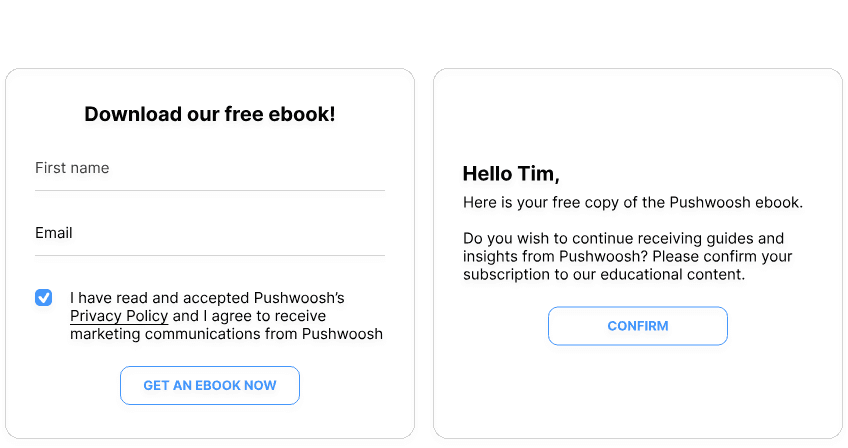


As it ensures that subscribers genuinely want to receive your emails, double opt-in reduces the risk of spam complaints and improves engagement rates. It also protects you from invalid or fake email addresses, as a pleasant bonus.
5. Make sure it’s easy to opt out of your emails
We all change our minds occasionally, and GDPR clearly requires you to provide a straightforward option for people to unsubscribe from your emails. But there’s more to unsubscribe links than that. For one, it’s better to lose a contact than to be repeatedly marked as spam, and that’s exactly what users tend to do when tired of your messages but unable to opt out.
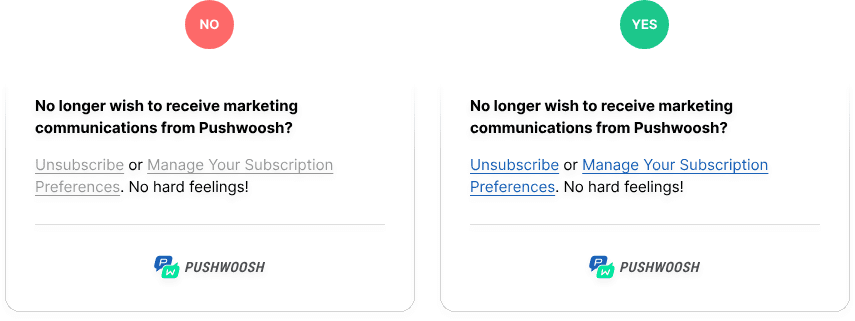
As such, featuring a clear, unambiguous unsubscribe link in your email’s footer benefits all parties involved. That’s also why Pushwoosh’s email templates come with default customizable “unsubscribe” tags.
6. Don’t send emails to inactive contacts
Sending emails to inactive contacts can harm your sender reputation and reduce overall engagement rates. ISPs track engagement, so low open rates may signal that your emails aren’t valuable. Regularly clean your email list by removing inactive subscribers or re-engaging them.
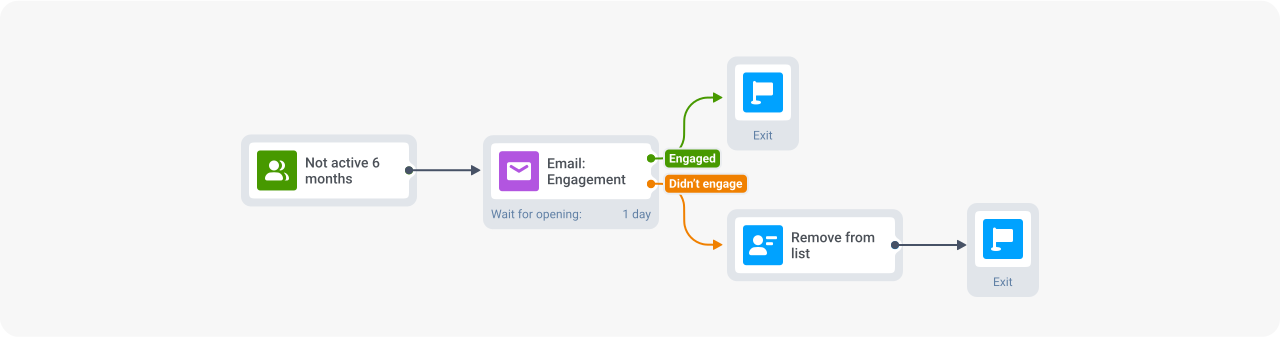
Email sunsetting is a common practice in which you let disengaged contacts decide whether to keep receiving your communications or be removed from the list.
For example, if a user hasn’t opened any of your emails in the past six months, consider sending a re-engagement campaign asking if they still want to hear from you. If they don’t respond, it’s better to remove them from your list.

7. Maintain regular email hygiene
Many of the practices we’ve already covered closely relate to email hygiene, but sometimes it pays off to double-check your lists anyway. Keeping your email list clean helps avoid sending to invalid or non-existent email addresses, which can lead to high bounce rates and damage your sender reputation.
Let’s say you’re running a major email marketing campaign. Use email deliverability tools or a verification service like ZeroBounce or EmailListVerify to remove any outdated contacts before setting it up. By doing so, you ensure your emails reach valid recipients, improving deliverability and maintaining a strong sender reputation.
8. Warm up your email IP gradually
In email marketing, an IP address is how recipients’ ISPs and spam filters recognize the sender. Multiple domains or websites use a shared IP address. A dedicated IP address, in turn, is assigned to a single domain.
When you move from a shared IP to a dedicated one, undergo significant IT infrastructure changes, or simply switch your Email Service Provider (ESP), practicing IP warmup is a good way to improve email deliverability.
What is IP warmup, you ask?
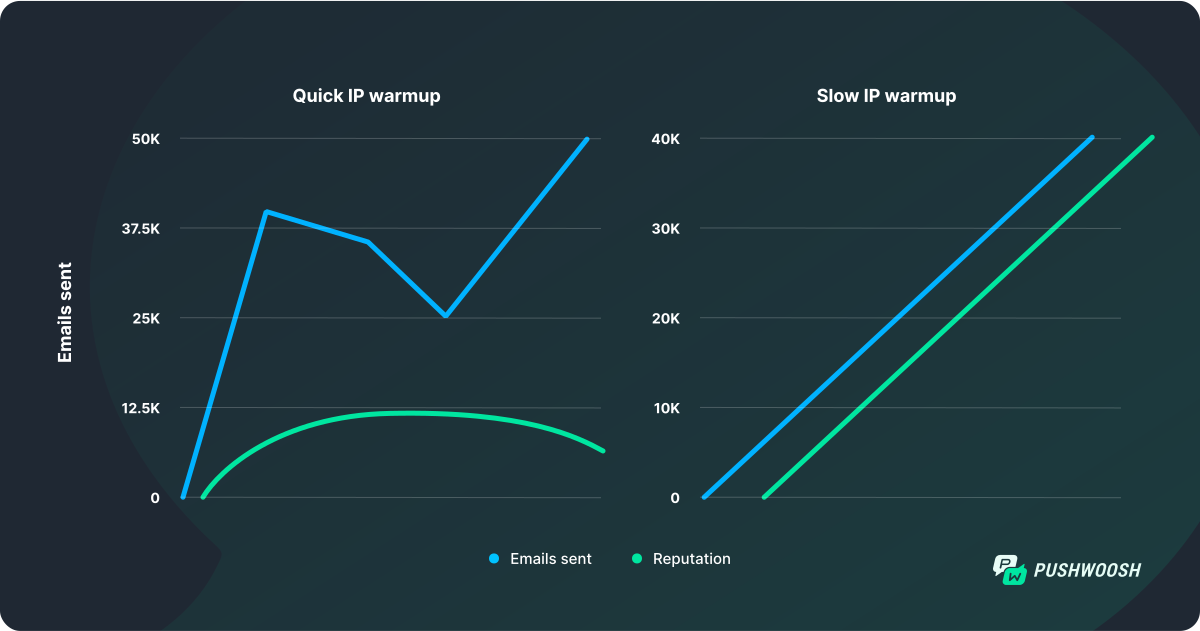
When you start sending emails from a new IP address, it’s crucial to warm it up gradually. Sending a high volume of emails right away can raise red flags for spam filters. Instead, begin by sending a small number of emails to your most engaged users and then gradually increase the volume over a few weeks (or months).
Your goal is to prove to the ISPs that your emails are trustworthy to maintain a high email deliverability rate. How can you achieve that? By ensuring the first batches of emails sent from the new IP are wanted (opened) and anticipated (whitelisted).
9. Ask subscribers to whitelist you
It’s as simple as that, really! If you’ve changed your IP recently or noticed delivery issues, nothing works better than candor — simply use your next email to ask your subscribers to whitelist your subsequent communications. You’ll be pleasantly surprised by the results.
10. Check for and avoid IP blocklists
By violating standard email marketing best practices, like sending emails to invalid/inactive addresses, using spammy content, or ignoring email authentication protocols, you risk ending up on IP blocklists.
That, in turn, can severely harm your email deliverability. When your IP is blocklisted, ESP may automatically flag your emails as spam or block them entirely, meaning they never reach your recipients’ inboxes. This can drastically reduce the effectiveness of your email marketing campaigns and damage your sender reputation.
Some popular free services for checking your IP against blocklists are DNS Checker and WhatIsMyIPAdress.
But we also feature an automated IP reputation check directly in Pushwoosh, which checks your IP against 100+ public mailing blacklists every hour.
11. Set up a custom email domain
Email domains are what come after @ in your email address. Using a custom email domain instead of a generic one (like Gmail or Yahoo) makes your brand look more professional. It improves deliverability by signaling to ISPs that your emails are legitimate.
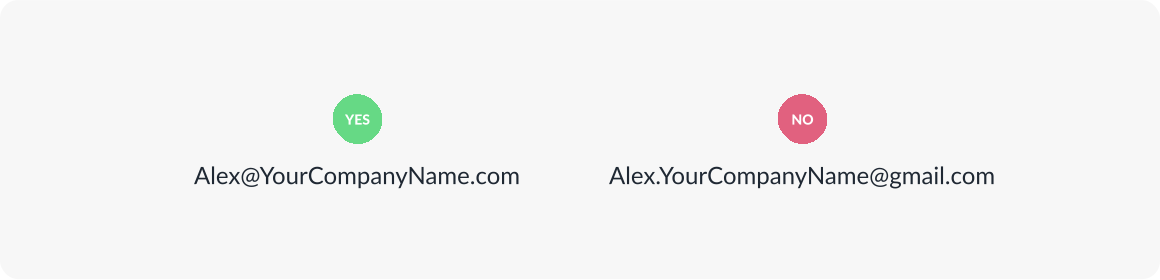
When configuring an email with a custom domain, make sure to set up all the major authentication protocols:
- SPF: Specifies which IP addresses are allowed to send emails on behalf of your domain.
- DKIM: Adds a digital signature to your emails, verifying they haven’t been altered during transmission.
- DMARC: Combines SPF and DKIM and sets policies for handling emails that fail authentication checks.
- DNS: Stores SPF, DKIM, and DMARC records, making them accessible for email servers to authenticate your emails.
12. Create a recognizable sender name
On top of the custom domain, you should also take care of the sender name. Typically, emails sent from marketing@YourCompanyName.com perform worse than the same messages coming from “Katie from YourCompanyName”.
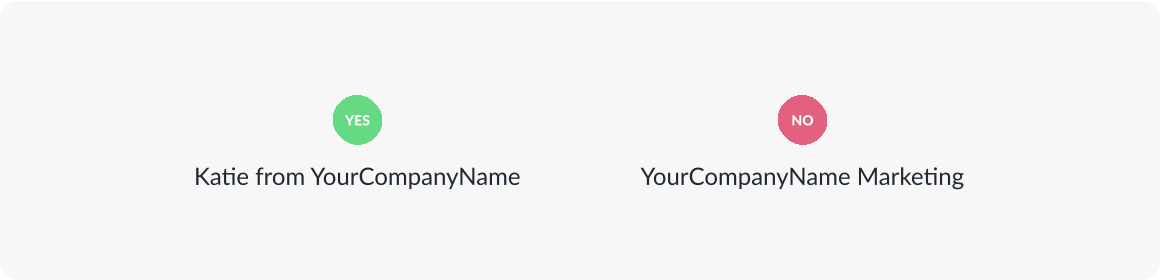
It makes your brand look more approachable and your communications more human, which inevitably translates into higher engagement and a better spam-bypass rate.
13. Maintain your sender reputation
Your IP reputation, a key component of the sender reputation, is like a credit score for email sending. A strong reputation means your emails are more likely to reach the inbox, while a poor reputation can lead to your emails being blocked or marked as spam. As such, the more of your emails that get opened at first, the higher the chances of them successfully avoiding spam in the future.
Monitor your IP reputation regularly, and if you notice a decline, review your sending practices and adjust accordingly. For example, if you see a spike in spam complaints, you might need to revisit your content or list hygiene practices.
A good ESP, like Pushwoosh, would run automatic IP reputation checks, but you can never be too careful here!
14. Optimize the body of your emails
The content of your email affects whether it gets flagged by spam filters as much, if not more so, than the initial email setup and list hygiene. Poorly structured emails with spammy elements can trigger these filters, negatively affecting your email deliverability.
Let’s do a quick exercise. Take a look at the email subject line below:
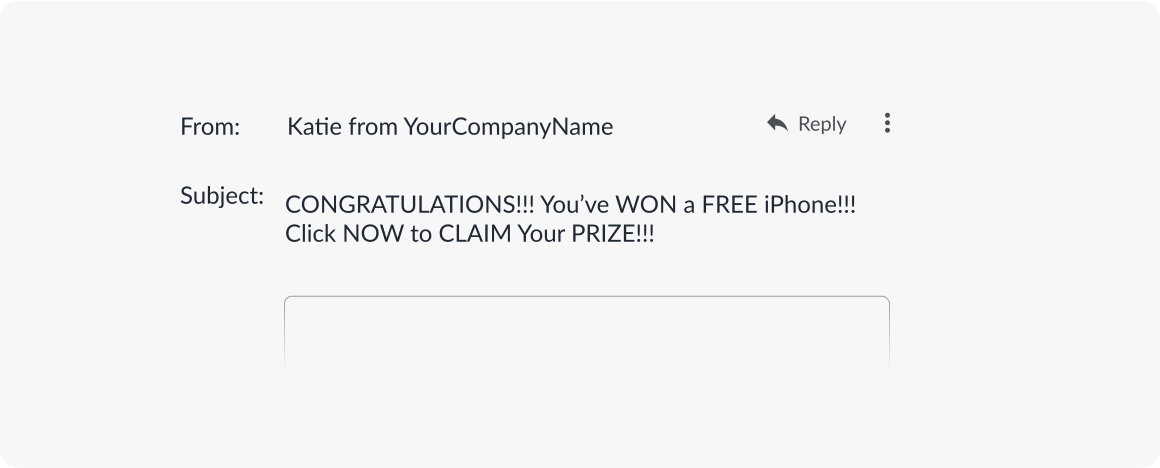
What exactly would you say is wrong with it, and how would you fix it to minimize spam reports?
To help your email successfully avoid spam traps:
- Stay clear of trigger words in subject lines. You may think it sounds like a solid CTA, but salesy words like “free”, “claim”, or even “congratulations” can result in your email being buried in the depths of the spam folder. To prevent that, keep your subject lines informative and direct. Pushwoosh AI Composer will help you get started if you’re stuck!
- Don’t use ALLCAPS. Not only does it make it seem like you’re screaming at the reader (and not in an excited way), but it also alerts spam filters to potentially low-quality content.
- Don’t overuse exclamation points!!! It’s similar to the previous point, as over-excitement is commonly associated with spammy ads, low-quality offers, and, well, haggling.
- Don’t go overboard with images. People like their emails sweet and to the point, and flashy, screaming content rarely is. That’s why many spam filters would find your gorgeous artwork to be nothing but an interruption. Keep in-body images to a minimum to increase deliverability.
- Add alt text to all the images you do use. That is not to say you should avoid imagery altogether. But make sure all the graphics featured in your email come with alt texts to improve accessibility and, hence, show ISPs and spam filters that you care about your recipient’s convenience.
- Don’t use video, Flash, or JavaScript in the body of your emails. It may seem like a good idea for driving additional engagement, but all it does is make your email heavier and noisier than it needs to be, and spam filters know that.
- Don’t include any attachments. Consider it a karmic retribution for every time you forgot to attach the document you promised to include in one of your emails. In marketing communications, it’s either a linked piece of text or nothing; attachments are so 2002!
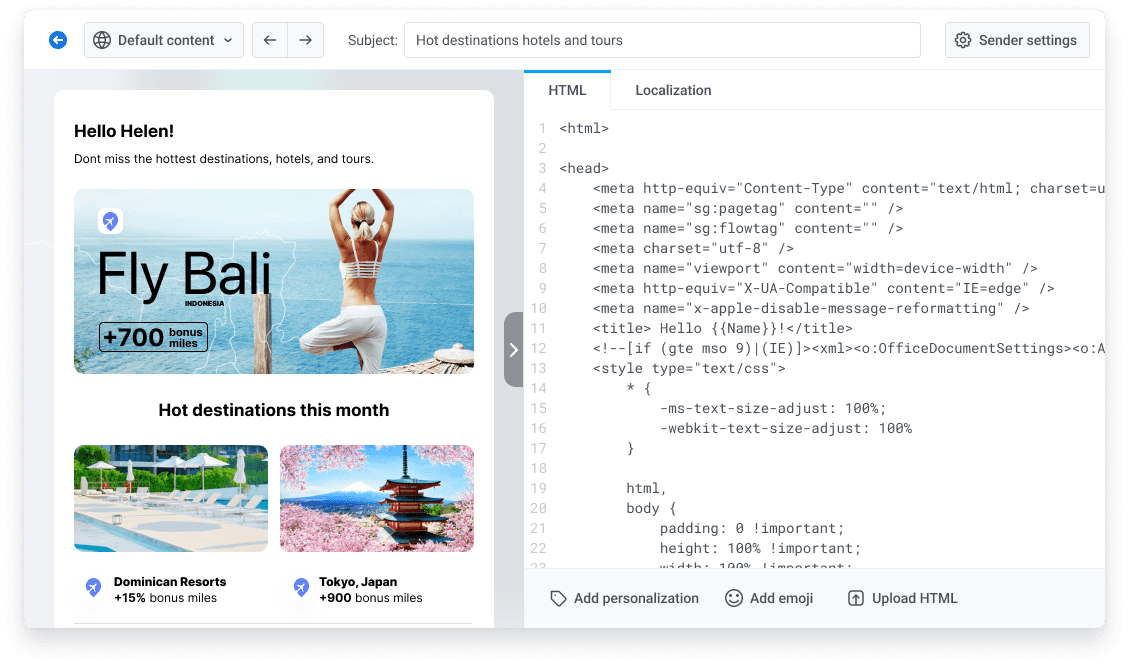
- Check HTML email versions before sending. Most ESPs let you design emails with responsive drag-and-drop editors; however, you must not forget plain HTML versions. In addition to improved looks, tools like Pushwoosh’s HTML Email Builder can also help you add interactive elements without engaging complex JS or Flash scripts.
15. Always test email deliverability before sending
Your next email marketing campaign will always remain only as good as the last one unless you learn from your own mistakes.
How to test email deliverability? Split-test your content if your list allows it. HubSpot recommends testing multiple versions of an email when you have at least 1,000 contacts to achieve statistically significant results.
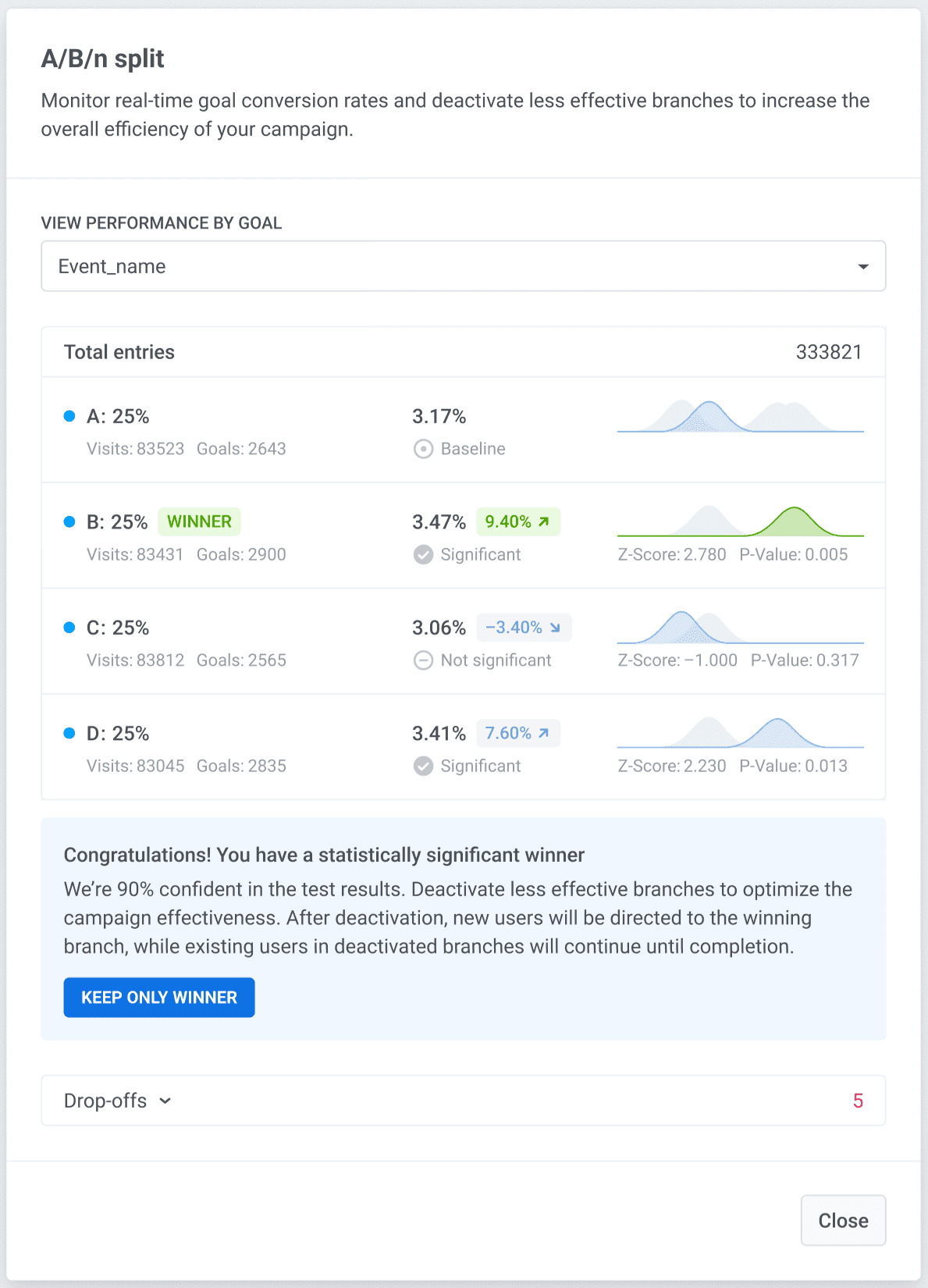
Thanks to A/B tests, you can experiment with subject lines, emojis, tone of voice, CTAs, and more to find out what your audience responds to best. Normally, A/B tests are run on a single variable (e.g., your CTA) in two versions (A and B). But in Pushwoosh, you can set up as many test versions as you like and truly understand your recipients’ needs.
Just make sure to test one variable per campaign; otherwise, you won’t know what drove the change in performance!
Pushwoosh – Best email deliverability tool
Okay, with best practices to improve email deliverability, you may feel overwhelmed with the amount of work ahead. Fortunately, simply by choosing an email service provider that meets your specific needs, you can take care of most of the deliverability struggles in one go.
Choose Pushwoosh as your email deliverability solution and:
- Set up emails in seconds with optimized, ready-made templates.
- Enjoy automatic consent management and data privacy adherence.
- Manage contact lists with ease thanks to automation engines.
- Avoid spam traps with automatic validation of SPF, DKIM, and DMARC configurations, ensuring seamless email authentication.
- A/B/n test multiple versions of email content, and much more!
FAQ
What factors affect email deliverability the most?
The biggest factors influencing email deliverability include sender reputation, domain authentication, list hygiene, spam complaint rate, bounce rate, email content, and user engagement (opens, clicks, replies). Poor performance in any of these areas increases the likelihood of landing in spam.
How do Gmail and Yahoo’s 2024–2025 rules affect deliverability?
Gmail and Yahoo now enforce stricter requirements for bulk senders (5,000+ emails/day): both SPF and DKIM authentication (with DMARC set to at least p=none), one-click unsubscribe for promotional emails, spam complaint rates below 0.3% (ideally under 0.1%), and TLS encryption. Failing to meet these requirements directly lowers email deliverability and can cause temporary errors, inbox placement issues, and message rejections.
Why are my emails going to spam, even with a healthy list?
Even high-quality lists can trigger spam filtering if your domain reputation is weak, your content appears promotional or repetitive, your sending frequency is inconsistent, or mailbox providers detect low engagement. Re-engagement campaigns and domain warm-up often solve the issue.
How can I test and monitor my email deliverability?
You can test and monitor email deliverability by tracking key metrics (bounce rate, spam complaints, inbox placement), running inbox placement tests, and checking your sender reputation with tools like Google Postmaster Tools or Microsoft SNDS. It’s also important to run spam-score and content tests before sending campaigns, verify your email list regularly, and monitor engagement signals such as opens and clicks.
Email automation solutions like Pushwoosh help maintain strong deliverability with built-in authentication checks (SPF, DKIM, DMARC), segmentation, and A/B/n testing.